Keyboard Layout Indicator - More than a keyboard layout indicator
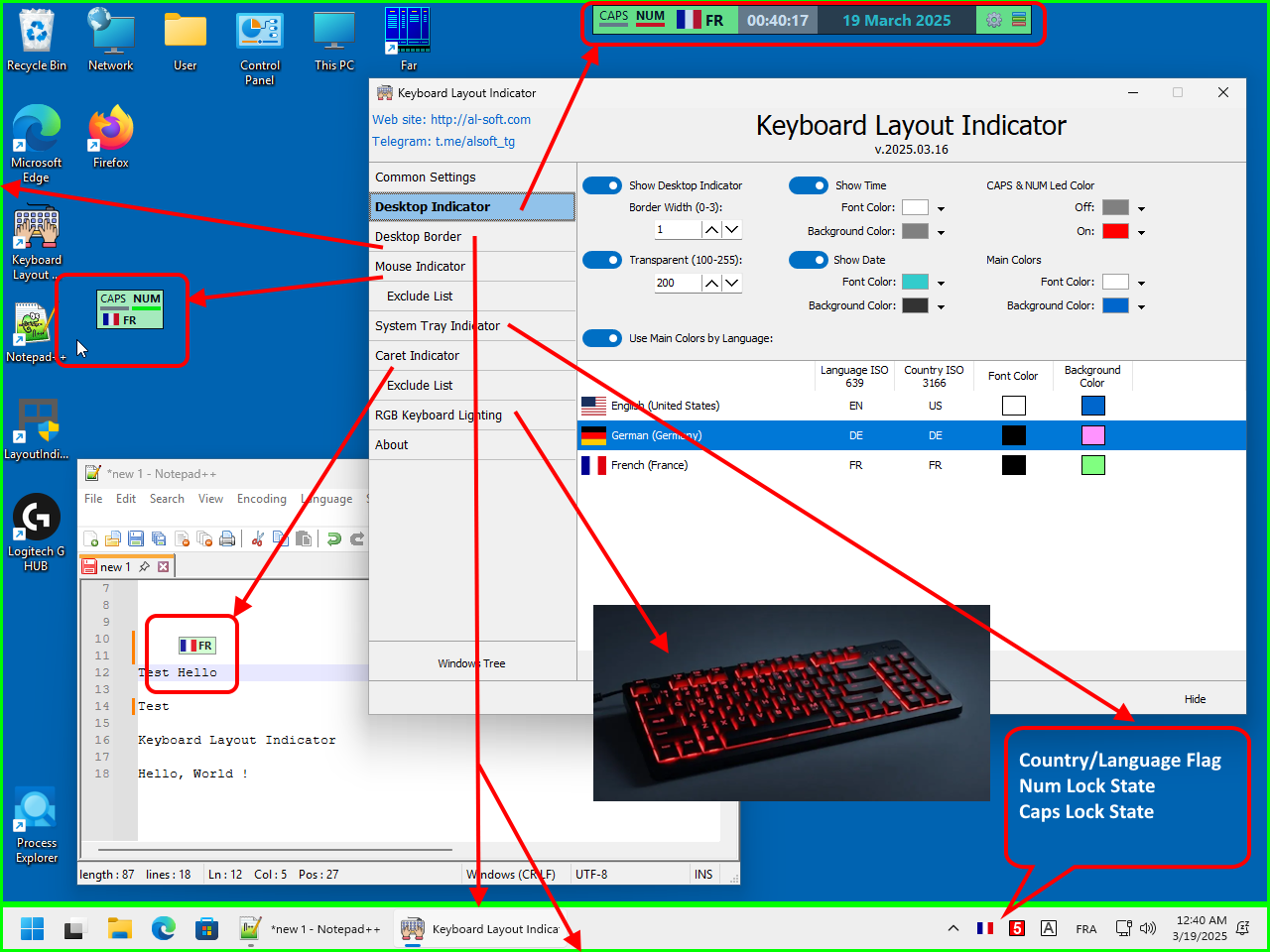
The Keyboard Layout Indicator is a highly customizable Windows utility that lets you see your current keyboard layout wherever you prefer — near the text cursor, mouse pointer, taskbar, desktop edges, system tray, or even on your RGB keyboard. Unlike simple language indicators, Keyboard Layout Indicator provides multiple independent visual indicators that can be used simultaneously and customized individually.
Types of indicators:
- Small floating desktop window
- Tooltip for mouse cursor
- Tooltip for text caret position
- State of CapsLock and NumLock
- Colored Desktop & Taskbar Edge Indicator. Each of the four edges of the desktop and taskbar can be enabled or disabled independently, allowing users to create anything from a complete border to a single discreet color bar.
- Three icons in the system area of the taskbar (language flag, CapsLock state, NumLock state)
- Any RGB Device (keyboard, mousepad, mouse etc) Lighting via OpenRGB SDK
If your keyboard or laptop does not have a Caps Lock or Num Lock indicators - «Keyboard Layout Indicator» will be useful for you