
AL Font Installer v 2.2
for Windows 95/98/ME/2000/NT/XP/2003
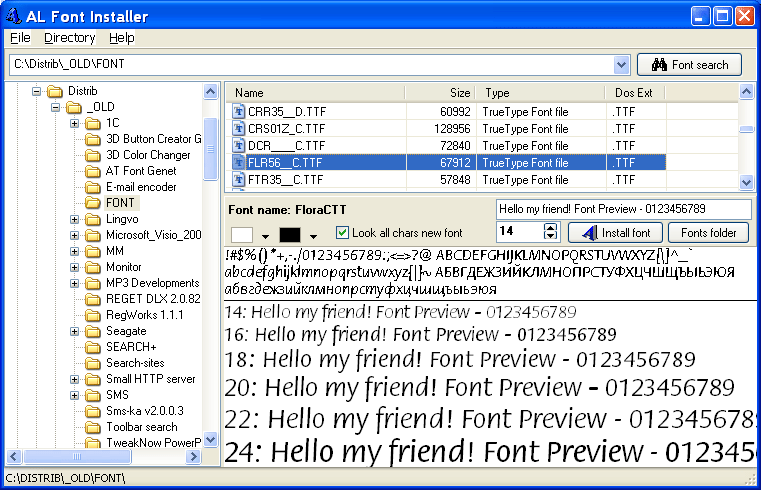
Description: This program is addition to the control panel Windows Fonts. It provides more convenient way for installing a new fonts on your computer. With the help of this program you can look through any fonts, how they will be installed on your computer. The fonts can be located on CD-R, CD-RW, hard drive or any other carrier supported by your computer. You can look through fonts before they will be installed. On viewing it is possible to change color of a background, color of symbols, size of the chosen font. Besides, it is possible to set a string or character set for viewing. You can install a font by one pressing of the button. There is an opportunity to see all character set of the chosen font.
download alfi_setup.exe (780kb)
This is a great bit of software if you're constantly having to take the long route when installing new fonts for use in any particular project. Constantly dragging and dropping TIF files can get a little tiring, as can waiting for Windows' file transfer to catch up with the large amounts of fonts you may want to install at one time. So alfi_setup.exe should solve this problem.
So if you're a graphic designer constantly churning through new fonts and pulling down endless amounts of new fonts through a broadband connection, you might want to install this as soon as possible. Allowing you to leave most of the hard work to your long-suffering computer, you can return to a wave of new fonts fully installed with a far better interface to do it in.
| Viewing of the not installed font | |
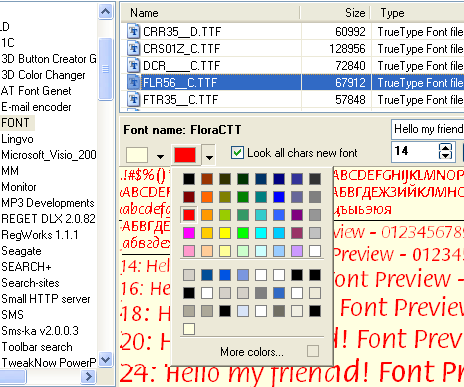 |
Working: You can use various combinations of color of a background and color of symbols at viewing. The size, type and full name of a font also are shown. |
Note: In the following version the program will have an opportunity to uninstall fonts and control panel applet clon.
| REGISTERING
This program is shareware. You may use it for 30 days trial period,
after this period is over you must register program or remove it from
your computer. You can register online!
 Click to buy! |
|
FREE TRIAL VERSION AL Font Installer can be used 30 days for free. Click here to obtain trial version |
| REQUIREMENTS
AL Font Installer is thoroughly tested under
the Windows 95/98/2000/ME/XP and NT4 operating systems. The needed
system configuration: Pentium 75 Mhz processor, 16 Mbytes RAM,
SVGA 640x480 with 256 colors or higher.
|
| SUPPORT Registered users of the AL Font Installer can
count on free technical support and getting fixed product and new
versions free. To get support please e-mail feedback
form |
Feedback form